

It’s time for the Standard 1 registration in Malaysia. This is not just another form to fill in. It marks your child’s official entry into the public school system and, for many families, the beginning of a whole new routine.
Between checking eligibility dates, choosing schools, and making sure nothing goes wrong online, it is easy to feel a little overwhelmed.
The good news is that standard 1 registration Malaysia follows a clear structure. Once you understand the timeline and steps involved, the process becomes far more manageable.
Whether this is your first child or simply your first time navigating the system, a little preparation goes a long way.
When Does Standard 1 Registration 2025–2026 Open?
Standard 1 registration Malaysia is mandatory for all children transitioning from preschool into the public education system. If your child is eligible and you intend to enrol them in a government primary school, registration is not optional.
For the 2025–2026 academic session, eligibility is strictly defined. Only children born between 2 January 2018 and 1 January 2019 can apply. If your child falls outside this range, the system will not accept the application.
The official online registration period runs from 1 March to 30 April 2025. While that may seem generous, many parents leave it until the final weeks, which can increase stress if technical issues arise.
Ideally, you should use February to prepare your documents and familiarise yourself with the registration portal, so March becomes about submission rather than scrambling.
Here is how you can register your child for Standard 1 for the 2025–2026 academic year, step by step.
Step-by-Step Guide to Tahun 1 Registration Online
The Ministry of Education (MOE) uses an online system to manage standard 1 registration Malaysia, designed to centralise applications and placements.
Step 1: Create a New User Account
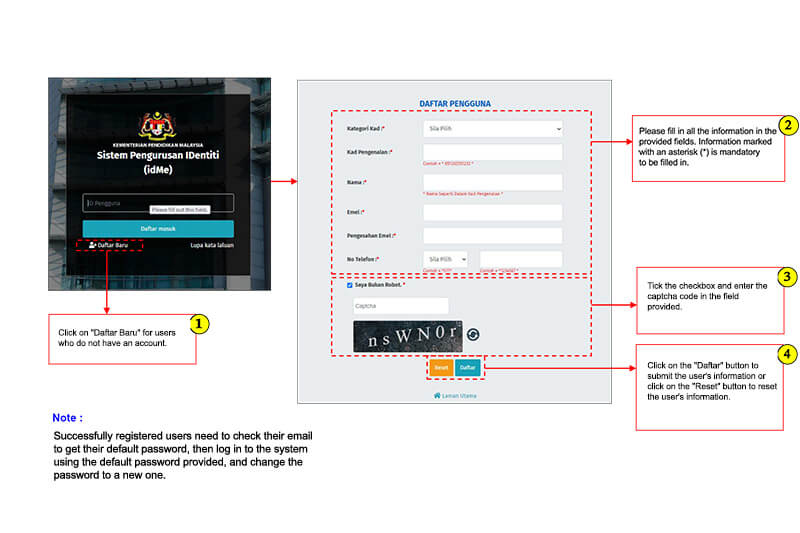

Sign up first if you haven’t created your idME account:
- Click on ‘Daftar Baru‘ for users who do not have an account.
- Please fill in all the information in the provided fields. Information marked with an asterisk (*) is mandatory to be filled in.
- Tick the checkbox and enter the captcha code in the field provided.
- Click on the ‘Daftar‘ button to submit the user’s information, or click on the ‘Reset’ button to reset the user’s information.
Note: Successfully registered users need to check their email to get their default password, then log in to the system using the default password provided, and change the password to a new one.
Step 2: Login to the MOE Registration Portal
Once your account is active, log in using your chosen credentials:
- Go to https://idme.moe.gov.my/
- Enter User ID.
- Click the ‘Daftar Masuk‘ button.
- Click the checkbox and enter the password in the provided field.
Avoid using public or unstable internet connections, especially when uploading documents.
Step 3: Fill in Your Child’s Profile Details
You will need to enter personal information such as your child’s full name, identification number, date of birth, and preschool background. Accuracy matters here, so take your time:
- Go to https://idme.moe.gov.my/. Both Google Chrome and Mozilla Firefox are acceptable browsers.
- Click on ‘Aplikasi‘ on the left side of the webpage.
- Click on ‘Pengurusan Awam‘. You will be directed to the official MOEIS site.
- On the left side of the dashboard, you will find ‘Pengurusan Profil‘. Click on this.
- Now complete the fields for each of the drop down options: ‘Maklumat Peribadi‘, ‘Maklumat Pasangan‘ and ‘Maklumat Anak Jagaan‘.
- This is where you fill in the details of yourself, your spouse and your child.
- Click on ‘Simpan‘ and go back to the main dashboard.
Step 4: Begin Registration
Once you have filled/updated your child’s details and other information, go back to the main dashboard. This is where you begin official registration process.
Follow the following instructions:
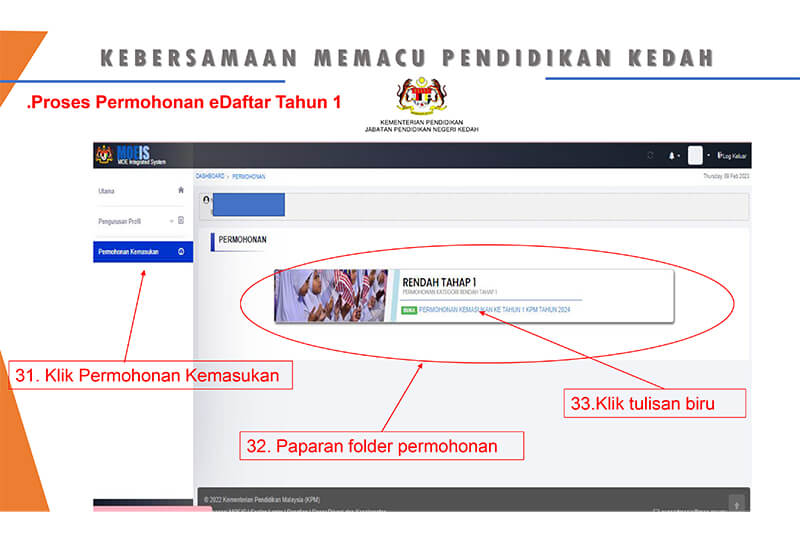
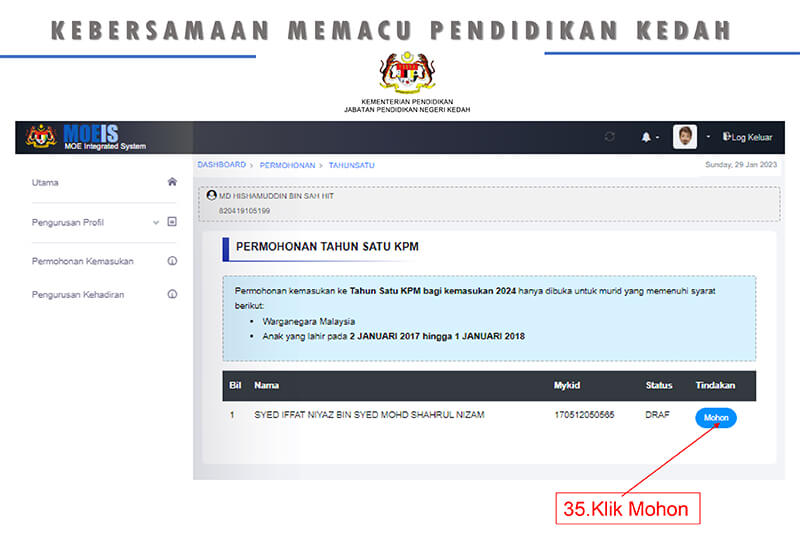
- Click on ‘Permohonan‘ on the dashboard, and then on the ‘Rendah Tahap 1‘ link.
- You will be redirected to another tab ‘Permohonan Tahun Satu KPM‘.
- On the bottom right, click on ‘Mohon‘.
- Click ‘Seterusnya‘. You will be directed to the registration window.
Step 5: Select Preferred Schools
Parents can choose preferred schools based on location and availability. Be mindful that some schools are highly sought after and may have limited placements.
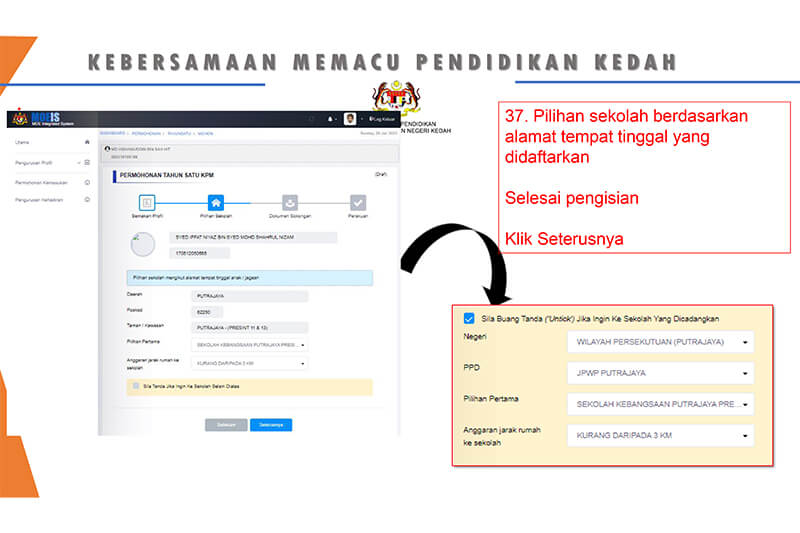
- Under ‘Semakan Profil‘, make sure all the details (name, address, IC number, etc) are correct. Then, click on ‘Seterusnya‘.
- Under ‘Pilihan Sekolah‘, fill in the district, postcode, area and the school of your choice. Then, click ‘Seterusnya‘.
Step 6: Upload Supporting Documents
All required documents must be uploaded in clear, readable formats. Poor-quality scans are one of the most common reasons applications are delayed.
Follow these instructions for the uploading stage:
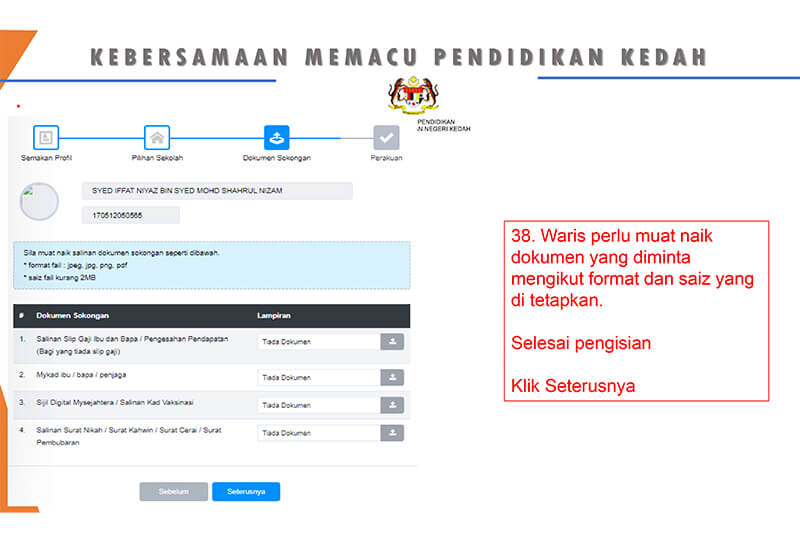
- Under ‘Dokumen Sokongan‘, you will need to upload the supporting documents in PDF format: parents’ payslip, parents’ IC, MySejahtera certificate or vaccination card, and marriage certificate.
- After that, click on ‘Seterusnya‘.
Step 7: Review and Submit Application
Review every section carefully before submitting. Once submitted, changes may be restricted. Once you are ready to submit the application, follow these instructions:
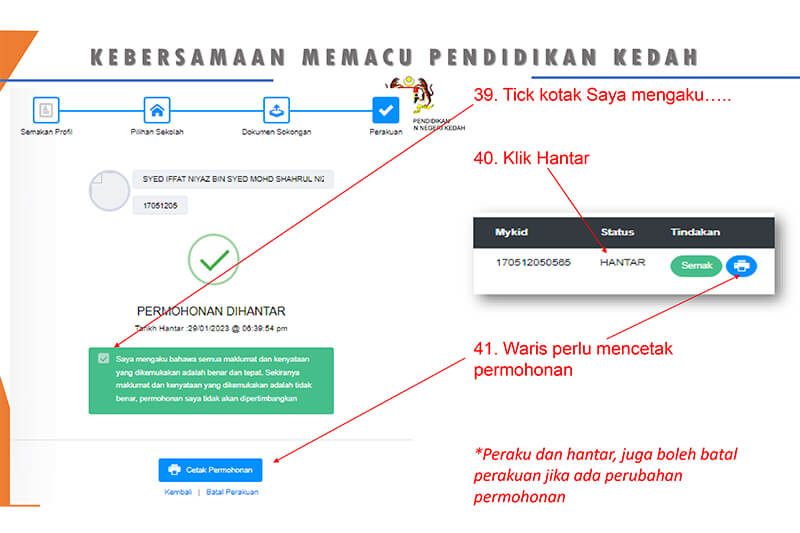
- Under ‘Perakuan‘, tick the box that says ‘Saya mengaku…’ and then click on ‘Hantar‘.
- Next, click on ‘Cetak Permohonan‘. Print two copies for the final registration.
- You will also need to print two other documents ‘Borang Pemeriksaan Kesihatan‘ and ‘Borang Rawatan Pergigian‘. These are provided under ‘Cetak Borang‘.
Step 8: Check Registration Status
You’ve successfully completed the online registration!
Wait for the results (it’s not announced yet) and the name of your child’s new school will be given.
Log in periodically to check your application status. Placement results and updates will be announced through the portal.
Documents Required for Standard 1 Registration in Malaysia
Preparing documents early makes standard 1 registration Malaysia significantly smoother.
a. Birth Certificate
A clear copy is required to confirm your child’s eligibility and age.
b. Parents’ Identity Card
Both parents’ or guardians’ identity cards are typically needed for verification.
c. Proof of Address
Utility bills or official correspondence showing your current address help determine school zoning.
d. Supporting Certificates
This includes documents related to adoption, medical needs, or special educational requirements. After you have completed the online registration for Standard 1 as highlighted above, print out the registration form.
The name of your child’s school will be given on the document. This is where you must go and send in the registration.
Bring the following supporting documents along during the physical registration process:
- Registration Form (2 copies)
- Health Service Approval and Immunisation Form with parent’s signature (original)
- Child’s Birth Certificate (original and 1 copy)
- Father’s Identification Card/Passport (original and 1 copy)
- Mother’s Identification Card/Passport (original and 1 copy)
- Marriage/Divorce Certificate, if applicable (original and 1 copy)
- Court Order/Custody Letter, if applicable (original and 1 copy)
- Latest Utility Bill/Electricity Bill (original or 1 copy)
- Rental Agreement, if applicable (1 copy)
- Child’s Immunisation Record with Injection Dates (1 copy)
- Health Documents/OKU Information, if applicable (original and 1 copy)
How to Choose the Right Primary School for Standard 1 Registration in Malaysia
Choosing a school is often the most emotionally charged part of standard 1 registration Malaysia. It is not just about enrolment.
It is about imagining where your child will spend the next six years.
- Location: Proximity matters more than many parents initially realise. A shorter commute can make mornings calmer and reduce long-term fatigue for both child and parent.
- Academic reputation: Some schools are known for strong academic performance, while others focus more on balanced development. Neither approach is wrong, but alignment with your child’s personality is key.
- Culture: A school’s environment can shape a child’s confidence and motivation. If possible, speak to other parents or teachers to understand the school culture beyond rankings.
- Managing expectations: Popular schools may not always have available placements. It is wise to list multiple options and remain flexible, especially in high-demand areas.
Common Issues During Registration and How to Fix Them
Even well-prepared parents can encounter hiccups during standard 1 registration Malaysia.
Technical Issues and Portal Downtime
High traffic during peak periods can slow the system. Logging in early in the morning or late at night often helps.
Incorrect or Rejected Documents
Blurry scans, incomplete pages, or mismatched information can cause rejections. Always double-check file clarity and consistency.
Forgotten Passwords and Login Problems
Use password recovery options early rather than waiting until deadlines approach.
Late Submissions and Missed Deadlines
While appeals may exist, late submissions are not guaranteed consideration. Treat the closing date as non-negotiable.
Frequently Asked Questions about Standard 1 Registration in Malaysia
Parents often have similar concerns when navigating standard 1 registration Malaysia.
1. What if my child is not placed in our first-choice school?
Placement depends on zoning and availability. If your first choice is unavailable, your child may be offered a place in another nearby school.
2. Can I make changes after submitting the application?
Changes may be limited once submitted. This is why reviewing carefully before submission is crucial.
3. Does preschool attendance affect placement?
Preschool details are recorded but do not guarantee placement in a particular school.
4. Is there an appeal process?
Yes, appeals may be available, but outcomes depend on vacancies and circumstances.
Time to Register Your Little One
Standard 1 registration Malaysia is a significant milestone, not just administratively but emotionally.
It signals a shift into structured learning and greater independence for your child.
With early preparation, realistic expectations, and a calm approach, the process can be completed smoothly, allowing you to focus on supporting your child as they step confidently into primary school life.
For more insightful stories and fun recipes, stay tuned to Motherhood Story!